EVX Software 4.0 is the all-in-one business management platform built for environmental consulting and engineering firms. Project management, billing, invoicing, financial control, and client management are connected in one place.
See EVX Software 4.0 in action
Book a private tour. No slides, no script, just the platform.
We'll reach out within one business day to schedule a time that works for you.
The changes in version 4.0 go deeper than the interface. This is a rebuild of how the platform works, from the way forms are structured to how templates drive project setup, to how your data flows into billing and financial reports.
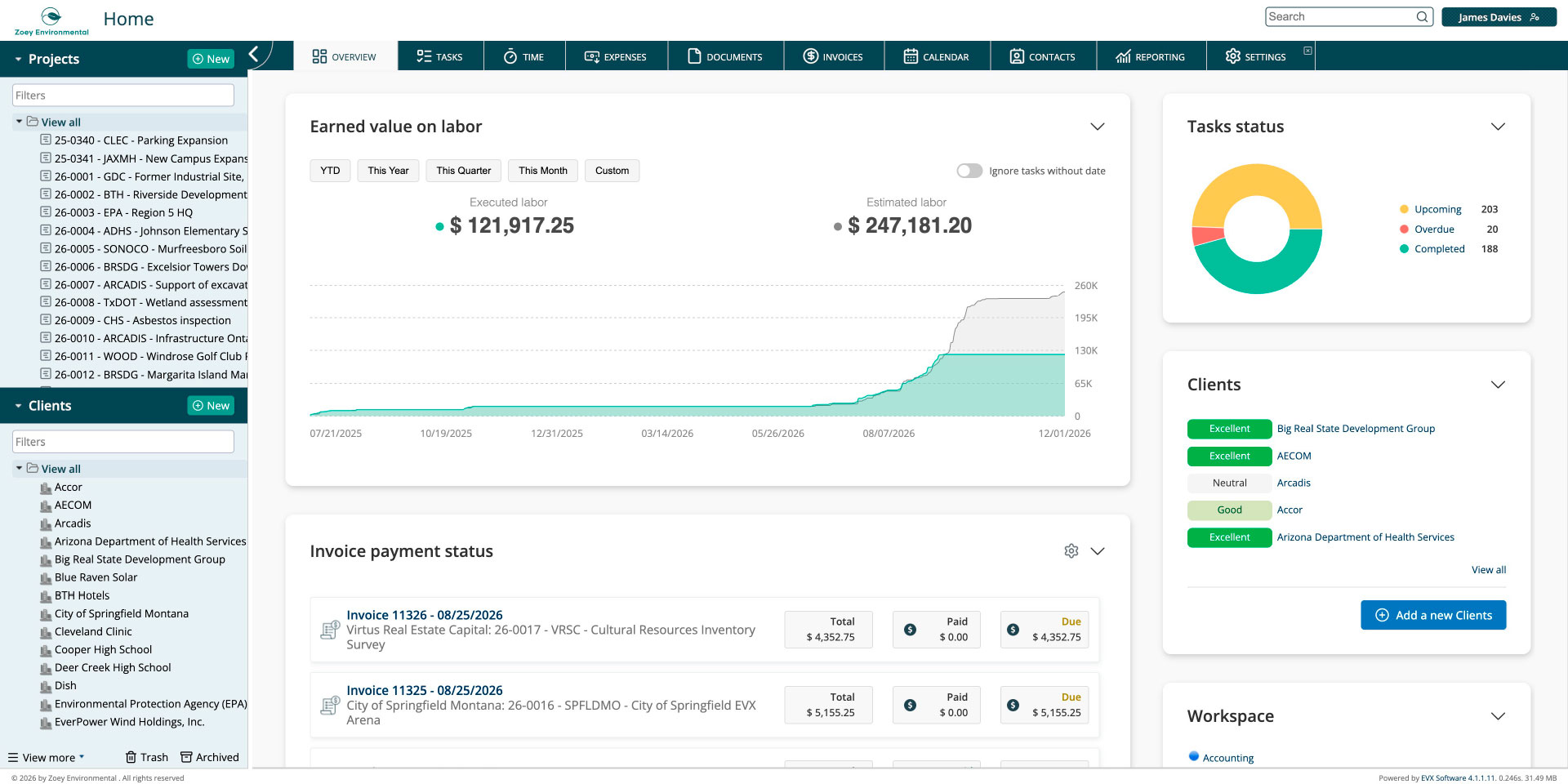
New icons, updated color scheme, and a visual structure built for modern screens. But the real change is underneath. Version 4.0 overhauled how data relationships work inside the platform, making the interface more stable and easier to navigate as your projects grow in complexity.
Inline editing allows you to update task details without opening the task itself. Hover over any data field to reveal the edit icon and change information directly from your current view. No more toggling between screens for minor updates.
EVX Software 4.0 lets you navigate data faster and with fewer clicks. Cursor hovering now previews a lot more information. You get the complete picture of a task’s data without leaving your current view, keeping your work simple and navigation to a minimum.
Custom properties now support formula logic. Define calculations, set decimal precision, and let the form handle the math as data is entered. Useful for markups, unit conversions, and budget totals without touching a spreadsheet.
Define conditions in your templates and set which task workflows run when those conditions are met. Selecting Phase II ESA as a project type can automatically trigger the right task sets. One template, multiple outcomes, no manual setup.
Set your naming rules once, and the project title updates in real time as you enter its details. No thinking and no handcrafted assembly. Most importantly, no inconsistencies across your project list.
Fully configurable card-based forms. Group data fields, reorder them, and choose between one or two column layouts. You can also pull data fields from related objects directly into the form you are working in, so the context you need is always visible.
Project templates now include budgeted expenses linked to specific tasks. When you create a project from a template, the budget structure comes with it, already connected to the right tasks and ready for the proposal stage.
Create project proposals with consistent scope and pricing by launching from templates that already include task structures and expense estimates. The financial foundation is established the moment the project is created.
Task details now populate automatically from project-level properties. Site dates, location codes, and client identifiers are all entered once at the project header and carried into every task that needs them. The same information stops living in two places.
Time entries under fixed fee tasks are now clearly (and automatically) labeled as fixed fee work. They appear as billable in your utilization and labor reports, but they are not billed directly to the client. When a parent task is set as a fixed fee task, child tasks inherit the status automatically.
Vendors, clients, and projects now sync with QuickBooks Online the moment they are created in EVX Software. Both systems stay aligned automatically. No double entry, no end-of-month reconciliation to catch what drifted.
New icons, updated color scheme, and a visual structure built for modern screens. But the real change is underneath. Version 4.0 overhauled how data relationships work inside the platform, making the interface more stable and easier to navigate as your projects grow in complexity.
Read more →
Click to expand
Inline editing allows you to update task details without opening the task itself. Hover over any data field to reveal the edit icon and change information directly from your current view. No more toggling between screens for minor updates.
Read more →EVX Software 4.0 lets you navigate data faster and with fewer clicks. Cursor hovering now previews a lot more information. You get the complete picture of a task's data without leaving your current view, keeping your work simple and navigation to a minimum.
Read more →Custom properties now support formula logic. Define calculations, set decimal precision, and let the form handle the math as data is entered. Useful for markups, unit conversions, and budget totals without touching a spreadsheet.
Read more →Define conditions in your templates and set which task workflows run when those conditions are met. Selecting Phase II ESA as a project type can automatically trigger the right task sets. One template, multiple outcomes, no manual setup.
Read more →Set your naming rules once, and the project title updates in real time as you enter its details. No thinking and no handcrafted assembly. Most importantly, no inconsistencies across your project list.
Read more →Fully configurable card-based forms. Group data fields, reorder them, and choose between one or two column layouts. You can also pull data fields from related objects directly into the form you are working in, so the context you need is always visible.
Read more →
Click to expand
Project templates now include budgeted expenses linked to specific tasks. When you create a project from a template, the budget structure comes with it, already connected to the right tasks and ready for the proposal stage.
Read more →Create project proposals with consistent scope and pricing by launching from templates that already include task structures and expense estimates. The financial foundation is established the moment the project is created.
Read more →Task details now populate automatically from project-level properties. Site dates, location codes, and client identifiers are all entered once at the project header and carried into every task that needs them. The same information stops living in two places.
Read more →Time entries under fixed fee tasks are now clearly (and automatically) labeled as fixed fee work. They appear as billable in your utilization and labor reports, but they are not billed directly to the client. When a parent task is set as a fixed fee task, child tasks inherit the status automatically.
Read more →
Click to expand
Vendors, clients, and projects now sync with QuickBooks Online the moment they are created in EVX Software. Both systems stay aligned automatically. No double entry, no end-of-month reconciliation to catch what drifted.
Read more →About EVX Software
EVX Software is not a generic project management tool with a few extra fields. It is a business management platform built specifically for environmental consulting and engineering firms, where projects are complex, billing structures vary, and the people doing the work are often the same people managing it.
We are software experts, not environmental professionals. Our job is to understand the operational reality of running a project-based environmental firm and build tools that clear the administrative path, so your team can stay focused on the work that actually matters.
Tasks, time entries, expenses, billing, and financial reporting live in one place. Nothing gets lost between the project and the invoice.
Multiple service lines, variable billing structures, and field work that doesn't fit a generic template. EVX Software was designed around that reality, not adapted to it.
You stop finding out a project is over budget after the invoice goes out. The reporting module shows where each project stands on budget, schedule, and billing at any point.
Implementation is not a handoff. Our support is 100% human, and we are present during setup, onboarding, and every step after that.
Field data in one place, invoices in another, reports in a third. EVX Software replaces that with a single working environment where everything connects.
Book a private tour
A private tour is a real conversation, not a scripted demo. You tell us how your firm works and we show you how EVX Software handles it. No pressure, no slides.

Book a private tour
Fill in your details and we will reach out within one business day to schedule a time that works for you.
No commitment required. We'll confirm your time within one business day.
We'll reach out within one business day to find a time that works for you. In the meantime, if you have any questions, just reply to our confirmation email.