Version 4 makes every form in EVX Software configurable. Set the field order, group properties, add custom fields, and connect dimension data, so the system collects information the way your firm actually works, not the way the software was built.
Every environmental consulting and engineering firm collects project data differently. The fields that matter to a remediation team are not the same ones a wetland mitigation group needs. And a firm running Phase I and Phase II Environmental Site Assessments has different information requirements than one focused on industrial hygiene or geotechnical work. But most project management software gives you one form, built the way the developer thought made sense, and expects everyone to adapt to it.Version 4 of EVX Software takes a different approach. Forms are now fully configurable, meaning your team decides how information is collected, organized, and displayed, not the software.
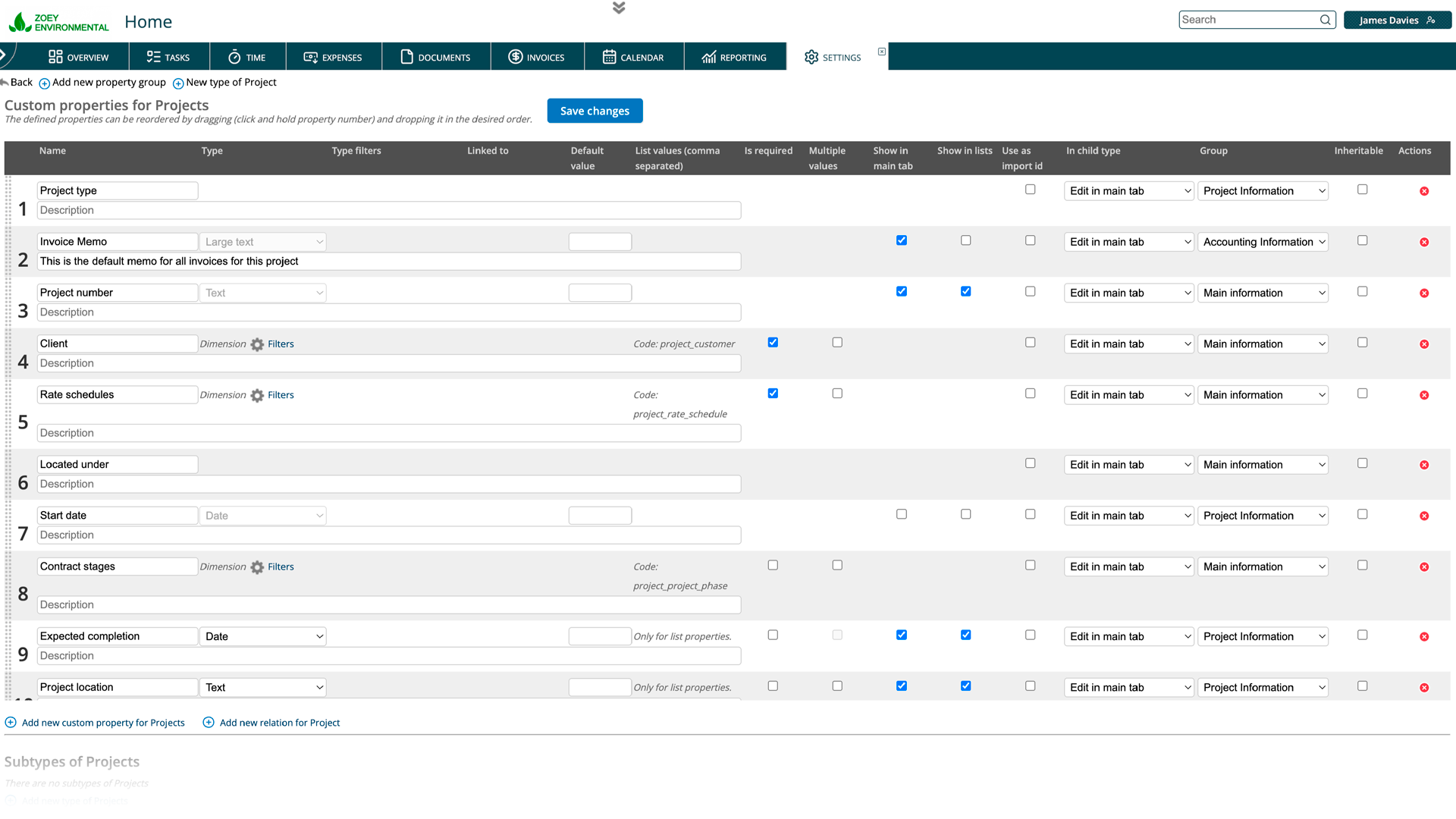
Fields can be organized into named groups using the Property Groups settings. This is where the card-based layout introduced in Version 4 becomes especially useful. Each group becomes its own card in the two-column form, so related fields are visually clustered together. A project form might have one card for general information, another for billing details, and another for field data specifics. The result is a form that's easier to fill out and easier to review, because the structure reflects the actual categories of information you're managing.
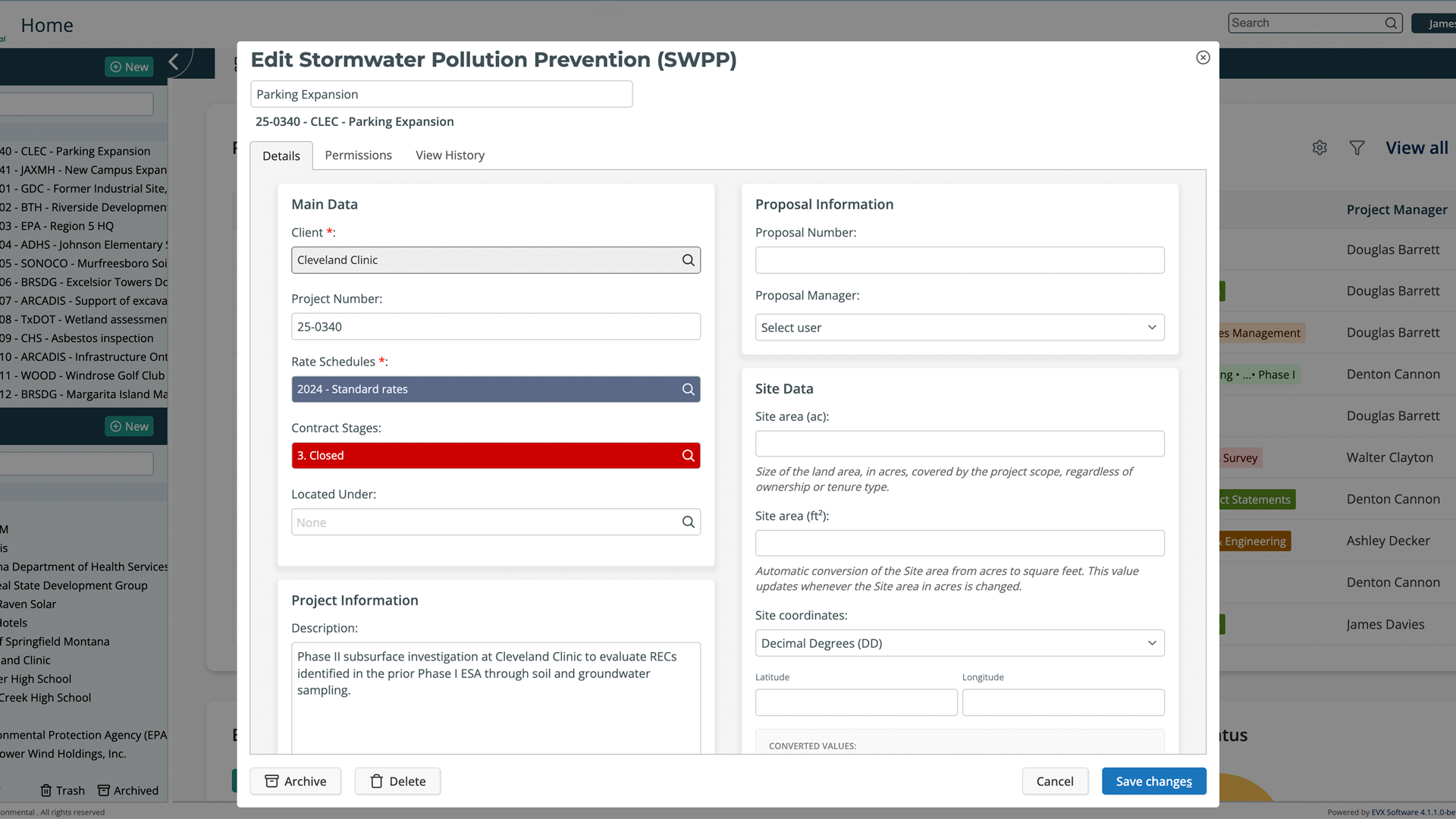
If EVX Software doesn't have a built-in field for something your firm tracks, you can create one. Custom properties are data fields you define yourself, with your own label and field type. This means you're not working around the system or stuffing data into fields that don't quite fit. You add what you need, name it the way your team already refers to it, and it becomes a permanent part of your form.
EVX Software is organized around dimensions, the core categories your firm uses to structure its data, things like project managers, clients, service types, and locations. When configuring a form, you can add fields that connect directly to these dimensions. For example, a project form can include a field that pulls from the Project Managers dimension, letting the user select from that list rather than typing a name manually. This keeps data consistent across the platform and makes reporting more reliable, because every project is connected to the same underlying records rather than free-text entries that can vary by person.Dimension relationships behave differently from simple lookup fields, because they carry the full context of the connected record. Selecting a project manager from the dimension doesn't just store a name; it links the project to that person's record in the system, which affects everything from time tracking to reporting.
Environmental projects are not generic. A Phase I ESA has different data requirements than a groundwater sampling campaign or a compensatory mitigation project. When your forms can be configured to match each service type, your team spends less time navigating irrelevant fields and less time explaining to clients why the system doesn't quite capture what the project actually involves.It also reduces errors. When fields are in the order your team expects, grouped the way your workflow is structured, and labeled with the terminology your firm actually uses, data entry becomes more consistent. And consistent data means cleaner reporting, more accurate billing, and less time spent correcting records after the fact.
Configuring a form in Version 4 starts in Settings. From there, go to Object Properties and select the object whose form you want to adjust. You'll see the current field layout and options to reorder fields, assign them to property groups, add custom properties, or include dimension relationships. Property groups are managed separately under the Property Groups section in settings, where you create and name the groups that will appear as cards in the form.The changes you make apply to everyone using that form across your organization, so it's worth taking a few minutes to think through the structure before configuring it. In most cases, the right starting point is to map out how your team actually fills out project information today, and build the form to match that process.
The Version 4 interface redesign is a practical response to how environmental consulting and engineering projects actually operate. Cleaner icons, better contrast, card-based forms, fewer clicks, contextual guidance, and improved project navigation; none of these are flashy changes, but together they produce a workspace that gets out of your way and lets you focus on the project.
Reading about an interface change only goes so far. If you want to see how Version 4 actually feels to work in, we're happy to walk you through it personally.
Book a private tour, and we'll show you the platform at your own pace.
A private tour is a real conversation, not a scripted demo. You tell us how your firm works and we show you how EVX Software handles it. No pressure, no slides.