Version 4 generates project names and numbers automatically as you fill out the form. Define your naming format once in settings, and EVX Software builds it in real time from the project data, consistently, every time, with no manual entry required.
Project naming sounds like a small thing until you've spent time searching for a project because someone named it differently than expected, or found duplicate entries because two people used slightly different formats, or realized your numbering system broke down somewhere along the way, and now you're not sure which version of a project record is the right one. For environmental consulting and engineering firms managing dozens of active projects at a time, inconsistent naming creates real problems in tracking, reporting, and billing.Version 4 of EVX Software removes the guesswork from project naming entirely.
The starting point is Settings, then General Configuration, then Autonumbering Prefixes Administration. Here, you define the structure of your project names: which data points to include, in what order, and how they connect. You might configure a format that pulls the client name, the project location, and the service type, separated by a dash, followed by an incremental number. Whatever naming convention your firm uses, you build it here once, and it applies to every project going forward.
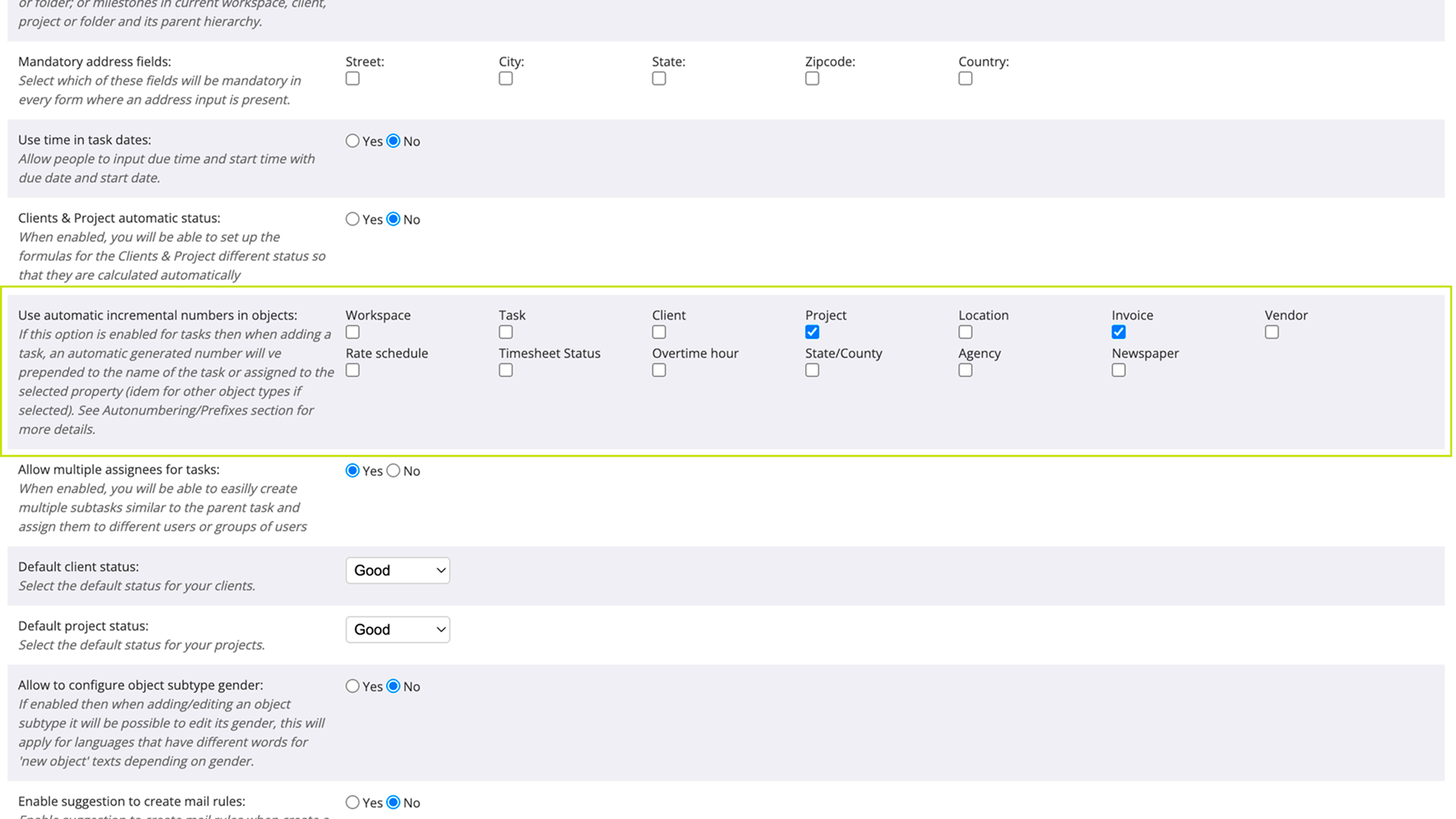
Once your format is configured, the project name assembles itself as you work. When you open a new project form and start filling in the fields, the name appears at the top of the form and updates in real time as you add each piece of information. Select the client, and the client's name appears in the name. Add the location, and it joins the structure. By the time the form is complete, the project name is already there, built correctly, with an incremental number assigned automatically to distinguish it from other projects with similar properties.

The variables in the name, the parts pulled from your configured format, are locked because changing them manually would defeat the purpose of having a consistent system. But if your naming format includes a free-text element, like a short project description or a custom label, that part remains editable. You get consistency where it matters and flexibility where it's needed.
Every project created in EVX Software follows the same format, regardless of who creates it or when. That consistency makes the project list easier to navigate, search results more reliable, and reports cleaner, because the data is structured the same way across every record.
The project name is built from data already being entered in the form. Client, location, service type: these fields exist in the project record for a reason, and now the naming system uses them directly. You're not entering the same information twice.
The numbering is automatic and incremental, so you never have to check what the last project number was or worry about assigning a duplicate. EVX Software handles it, and the number is part of the name from the moment the project is created.
Environmental firms often run concurrent projects across multiple clients, locations, and service types. Phase I ESAs, remediation projects, wetland mitigation work, and geotechnical assessments each need to be clearly identifiable without ambiguity. A consistent, automatically generated project name means anyone on the team can find the right project quickly, and the records behind it are structured well enough to support accurate reporting and billing from the start.
Automatic project naming in Version 4 means your firm's naming convention is defined once and applied consistently to every project, built in real time from the data you're already entering. No manual typing, no inconsistencies, no double entry, and no gaps in your numbering sequence. The project name is ready before you finish the form.
Reading about an interface change only goes so far. If you want to see how Version 4 actually feels to work in, we're happy to walk you through it personally.
Book a private tour, and we'll show you the platform at your own pace.
A private tour is a real conversation, not a scripted demo. You tell us how your firm works and we show you how EVX Software handles it. No pressure, no slides.