Version 4 adds formula fields to EVX Software forms. Define a calculation once, and the system displays the result automatically, useful for firms working across different unit systems, regulatory standards, or contract requirements without manual conversion steps.
Environmental consulting and engineering firms don't always work under the same set of rules. A firm might have federal contracts that require metric measurements alongside state clients that work in imperial units. They might serve industries with different reporting standards, or operate across regions where temperature, distance, and area are expressed differently by regulation. Managing those variations has traditionally meant doing the conversion somewhere outside the project record, in a spreadsheet, a calculator, or someone's head, and then manually entering the result. That's extra work, and it's a reliable source of errors.Version 4 of EVX Software introduces formula fields, a way to build those calculations directly into your forms so the translation happens automatically, right where the data lives.
A formula field is a type of custom property. You create it through the same Object Properties settings used for any other custom property, give it a label, define the calculation, and add it to the form. From that point on, it works on its own. When a value is entered in the field it references, the formula field calculates and displays the result automatically. The user doesn't do anything extra; the answer is just there.The result is read-only, which is the point. It's a derived value, not something that should be edited manually, because it's always calculated from the source data already in the form.
If your firm operates under contracts or regulations that use different unit systems, a formula field handles the translation inside the project record. Enter a site area in acres, and a formula field can display the equivalent in hectares. Record a temperature reading in Fahrenheit, and the Celsius value appears alongside it. There's no separate conversion step and no risk of the translated value getting out of sync with the original because someone forgot to update it.
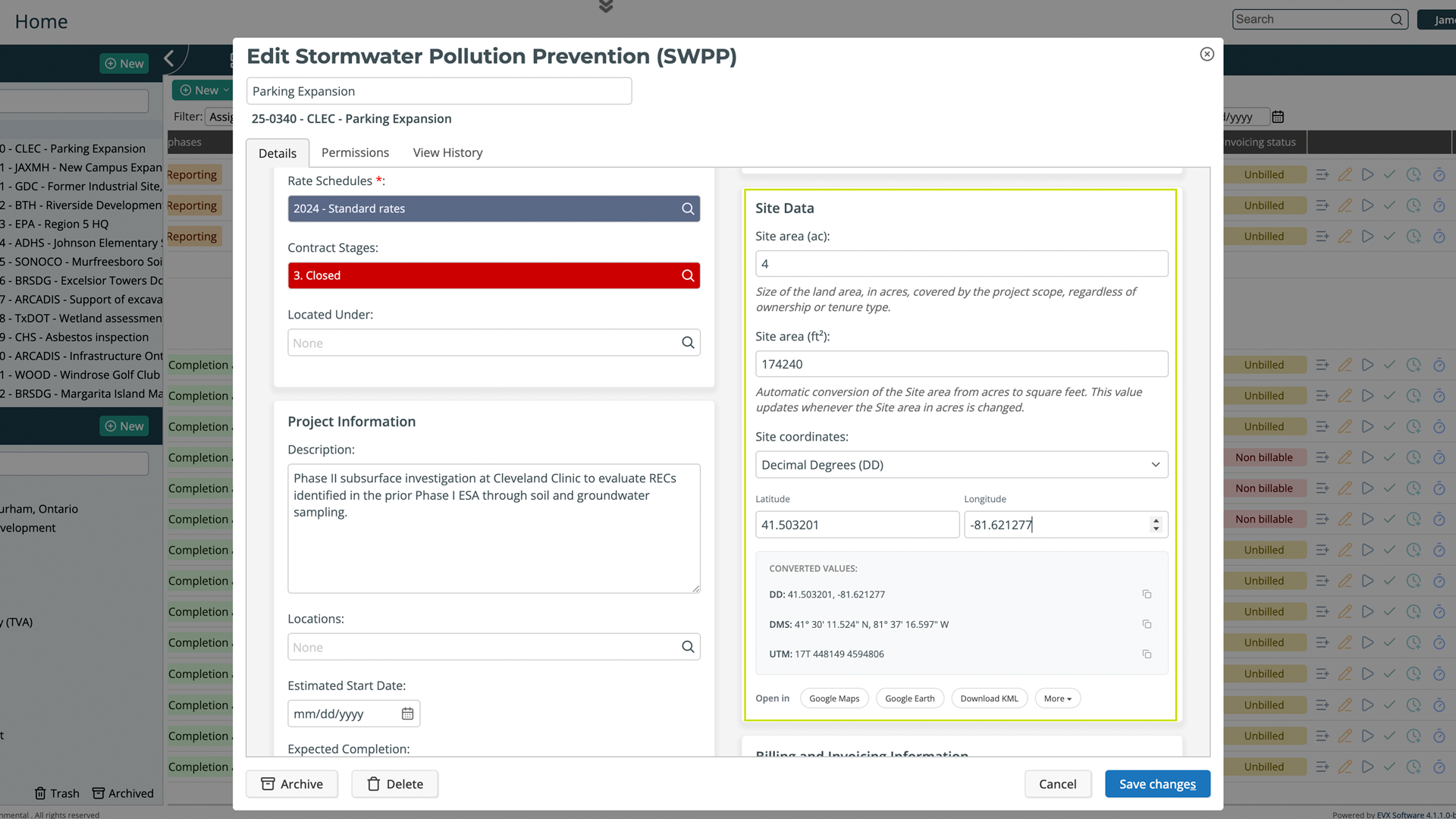
Some clients require data in specific formats or units as part of their contract requirements. Rather than maintaining separate records or running conversions at the reporting stage, you configure the formula field once for that form, and it handles the requirement automatically for every project that uses it. The client gets what they need, and your team doesn't have to think about it each time.
Firms working across jurisdictions, or across different project types like remediation, wetland mitigation, or geotechnical work, often deal with data standards that don't align. Formula fields let you build those regional or regulatory variations into the form itself, so the right values are always present regardless of who is filling out the record or where the project is located.
Formula fields are created in Settings, under Object Properties. When adding a new custom property, you select the formula type, write the calculation using other fields in the same form as references, and label the field clearly. Then you add it to the form layout through the same configuration used for any other property. Once it's in place, it works automatically for everyone using that form, no training required beyond knowing the value will be there.
The practical difference between doing a conversion in a spreadsheet and doing it inside EVX Software is where the result ends up. A calculation done outside the system lives outside the project record. It might be in a file, an email, or someone's notes, and it has to be manually transferred back into the project if it's needed there. A formula field keeps the result attached to the project from the start, visible to everyone with access, consistent across records, and always based on the current source value.
For firms where data accuracy feeds directly into regulatory submissions, client deliverables, or technical reports, that difference is not a small one.
Formula fields in Version 4 let you build automatic calculations into your project forms, so data translation between unit systems, regulatory formats, or client requirements happens inside EVX Software without any manual steps. You define the calculation once, and from that point on, the right value is always there, derived automatically from the data already in the form.
Reading about an interface change only goes so far. If you want to see how Version 4 actually feels to work in, we're happy to walk you through it personally.
Book a private tour, and we'll show you the platform at your own pace.
A private tour is a real conversation, not a scripted demo. You tell us how your firm works and we show you how EVX Software handles it. No pressure, no slides.