In Version 4, editing a task field no longer means opening the full task. Click directly on the field you need to change, update it, and move on. Inline editing in the tasks module makes daily project management noticeably faster.
In EVX Software, the tasks module is where most of the daily work happens. It's where your team tracks what needs to get done, who's doing it, when it's due, and what phase it belongs to. When that module is slow to navigate, the friction builds up fast, not in one big moment, but in dozens of small ones throughout the day. An extra click here, an unnecessary screen load there, and before long, your team is spending real time on things that should take seconds.
With inline editing in Version 4, you click directly on the field you want to change, right from the task list. The field becomes editable in place; you make the update, and you're done. No opening the task, no navigating to an edit mode, no extra steps.This applies to the fields your team interacts with most during daily operations: task names, due dates, job phases, and other key properties visible in the task list. The change happens where you're already looking, without losing your place in the list.
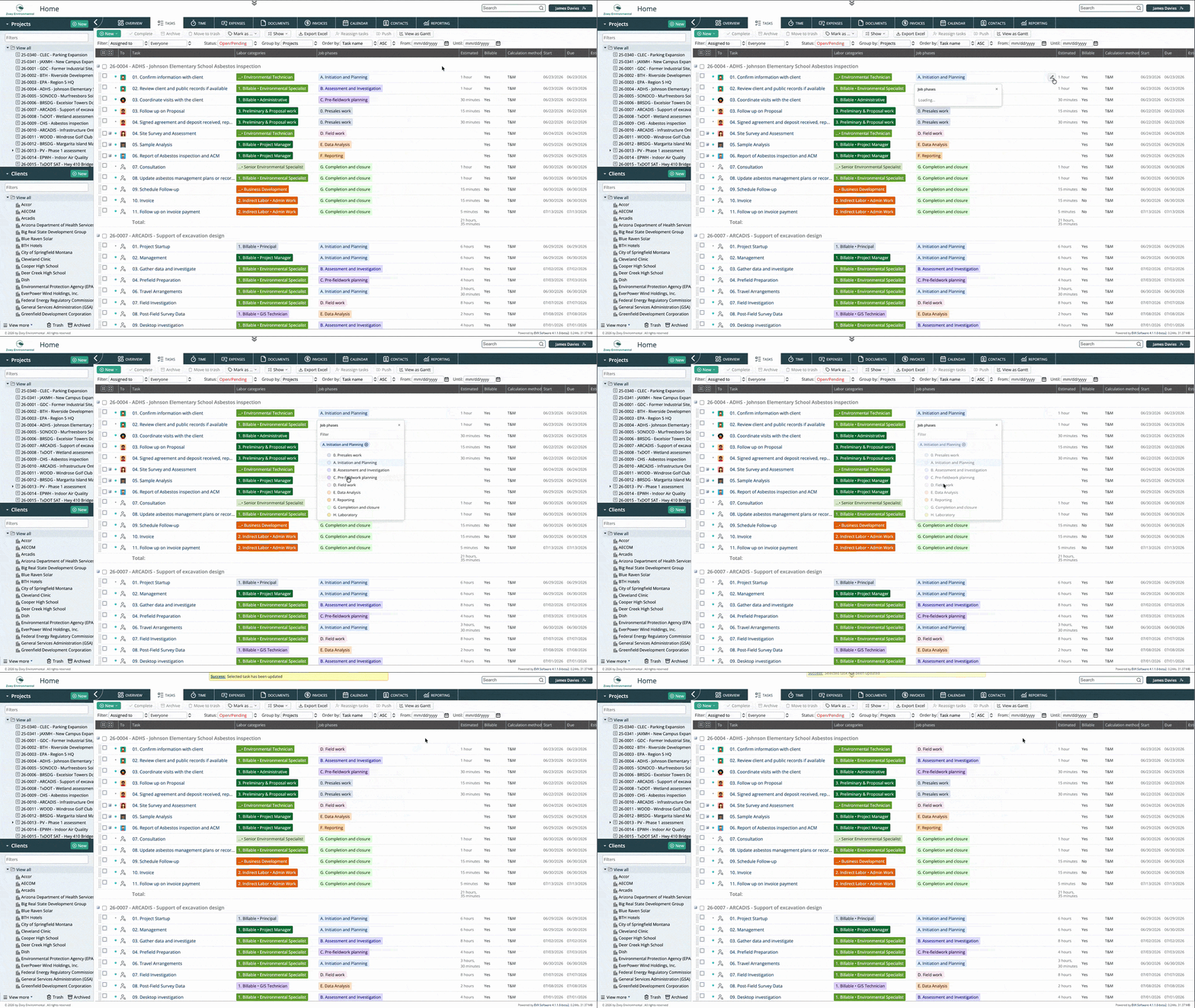
When a project manager reviews the task list at the start or end of a day, they're often making small adjustments as they go. A deadline moves, a phase gets updated, a task gets reassigned. With inline editing, those adjustments happen in the same view they're already working in. The review doesn't stop every time something needs changing.
For team members updating their own tasks, the difference is equally noticeable. Logging progress or adjusting a due date no longer means navigating into the full task record and back out again. It's a click, a change, and done. That reduction in friction, small as it sounds, makes the system easier to keep up to date, which means the data in EVX Software stays more accurate over time.
Because inline editing is field-specific, you're only touching the field you clicked on. There's no risk of inadvertently editing other fields while navigating through a full task form to reach the one you need.
Inline editing is available in the tasks module, which is the core of daily operations in EVX Software. This is intentional. The tasks module is where your team spends the most time and where the efficiency gains from reducing clicks are most felt. Fields like task name, due date, and job phase can all be edited directly from the task list view without opening the task record.
Inline editing in Version 4 removes the steps that used to stand between noticing something that needs updating and actually updating it. Click the field, make the change, move on. For teams managing complex environmental projects with a large number of tasks, simplicity has a real effect on how the day flows.
Reading about an interface change only goes so far. If you want to see how Version 4 actually feels to work in, we're happy to walk you through it personally.
Book a private tour, and we'll show you the platform at your own pace.
A private tour is a real conversation, not a scripted demo. You tell us how your firm works and we show you how EVX Software handles it. No pressure, no slides.